Your own work
Leads, customers, sales documents, projects, tasks, tickets and time, as a member of staff sees them once an administrator has given them access.
The Employee role a workspace starts with has none of the customer-facing modules: no leads, no customers, no estimates or invoices, no projects, tasks, tickets or timesheets (see The Employee role, as shipped). What your salespeople or your delivery team should reach is the business's decision, so an administrator adds it — by editing the role, making a new one, or changing your permissions alone (see Roles and permissions).
This page is about what you see once they have. Each area links to the full description of its screens in the CRM admin pages; here is only what is different when your role is limited. Every grant has two halves, and both show on the screen:
- The abilities — View, Create, Edit, Delete, Export. A missing ability removes its button; the rest of the page stays.
- The scope — whose records. The role editor offers All records, Their teams, Assigned to them, Their clients, Their own records and No access, but each module only the ones that mean something for it. The scope narrows the list itself, its counts, the search box, the dashboard and every export: a record outside it is not greyed out, it is simply not there.
The examples on this page show Alan, whose administrator made him a role called Sales assistant: the Employee role plus leads (Assigned to them), customers (Their own records), estimates and invoices to read (Their clients), projects to read (Assigned to them), tasks and tickets (Assigned to them) and his own time.
 Leads seen by a Sales assistant: only the leads he is on, New lead but no Export, and a menu that stops at the modules his role reaches.
A word about "Their teams"
Wherever a scope says Their teams, it means the people who share at least one team with you, and you. Teams are made, and their members chosen, under Organisation → Teams (see Teams); the same teams can be ticked on each person's staff record, in the Teams boxes of the Add staff member and Edit dialogs. Somebody on no team at all has nobody to share one with, so on Their teams they see only what is theirs.
Leads
CRM → Leads, with All leads and Pipeline under it. The screens are described on Leads and customers. The scopes a role can give leads:
| Scope | The leads you see |
|---|---|
| Assigned to them | Leads whose Assigned to is you, and leads where you are in Also working it. The usual choice for a salesperson, and the default for a new role. |
| Their own records | Leads you created. A lead that arrived by itself — from a web-to-lead form or an email address — was created by nobody, so it never appears under this scope. |
| Their teams | Leads assigned to, or also worked by, anybody who shares a team with you. |
| All records | Every lead in the workspace. |
| No access | None. |
A new lead starts assigned to you. With Assigned to them, a lead you create and then assign to a colleague leaves your list when you save it, unless you also put yourself in Also working it.
 A lead without the Delete ability and without Create on customers: Edit and the menu are there, Delete and Convert to customer are not.
What each missing ability takes away:
| Without | What changes |
|---|---|
| Create | No New lead on the list or the pipeline. |
| Edit | No Edit button, and no Mark as lost or Mark as junk in the lead's menu; the pipeline is read-only, so cards cannot be dragged; and the edit actions in the bar that appears when you tick leads are gone. With Delete but not Edit, the menu holds Delete alone. |
| Delete | No Delete in the lead's menu or among the bulk actions. Without Edit as well, there is no menu at all. |
| Export | The list offers Print only, never Export. With the privacy tools on, a lead's Export its data is gone too (and Anonymise needs Delete). |
Convert to customer is not a lead ability: it needs Create on Customers & contacts, because converting makes a customer. Without it the button is simply missing, as in the picture above.
Customers
 Customers on Their own records: the two accounts he owns, Print but no New customer and no Export.
CRM → Customers, described on Leads and customers. The Customers & contacts module offers four scopes — there is no Their clients here, because the customer is the client:
| Scope | The customers you see |
|---|---|
| Their own records | Customers whose Account owner is you, and customers where you are Also on the account. The default for a new role. |
| Their teams | Customers owned by, or with on the account, anybody who shares a team with you. |
| All records | Every customer. |
| No access | None. |
A customer's page shows the Profile, Contacts, Files, Reminders and Notes tabs to anybody who can open it. Every other tab needs its own module: Invoices needs View on invoices, Projects on projects, Tickets on support tickets, and so on — and lists only what your own scope for that kind of record reaches. Being able to open a customer is not being able to see all of its invoices: on Assigned to them for projects, the Projects tab shows only the customer's projects you are on, and Payments only the payments on invoices you can see. Statement needs View on reports, Activity needs View on staff, and Vault needs the separate Customer vault module — being able to read the customer list is deliberately not a way to read a client's passwords. Without Edit on customers there is no Edit on the page and no bulk changes; without Delete, no delete; without Create, no New customer.
Estimates, invoices and other sales documents
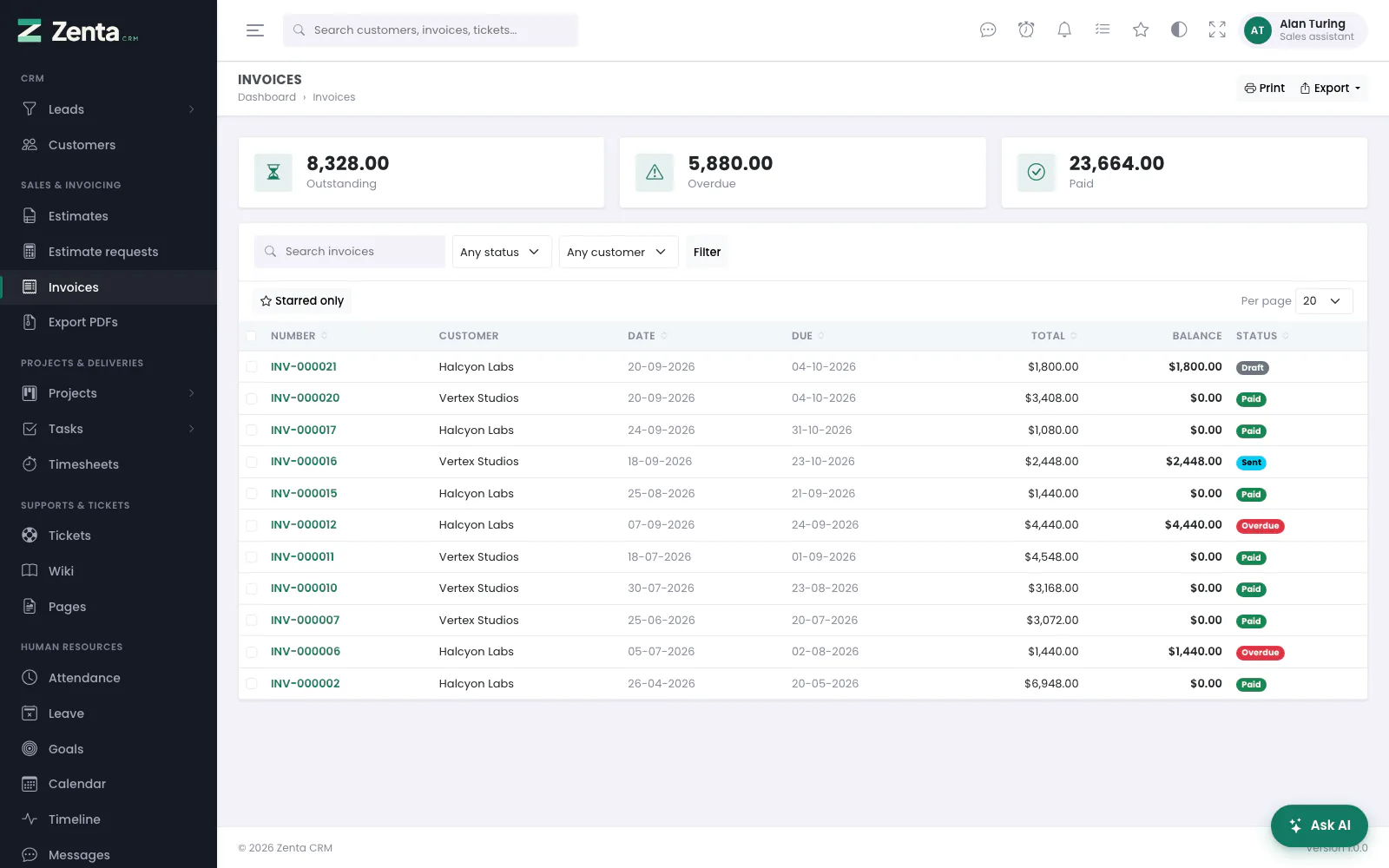 Invoices on Their clients: only the invoices of the two customers he works. View alone still offers Export, holding only PDFs in a zip.
Sales & Invoicing in the menu; the screens are on Estimates and proposals and Invoices and money. Estimates, invoices, credit notes, contracts and subscriptions share the same scopes:
| Scope | The documents you see |
|---|---|
| Their clients | Documents for customers whose Account owner is you, or where you are Also on the account — the same customers the customer list shows you on Their own records. |
| Their own records | Documents you created. |
| Their teams | Documents for customers owned by, or with on the account, anybody who shares a team with you. |
| All records | All of them. |
Proposals add Assigned to them (proposals assigned to you), and their Their clients also takes in proposals written to a lead assigned to you. Estimate requests on Their clients are those assigned to you or from a customer you work. Payments and Items are all or nothing.
With View alone, as above, there is no New invoice and no editing. The Export button is still there on the invoice list, but holds only PDFs in a zip… — the PDFs of the documents you can see. The spreadsheet exports appear with the Export ability.
Projects
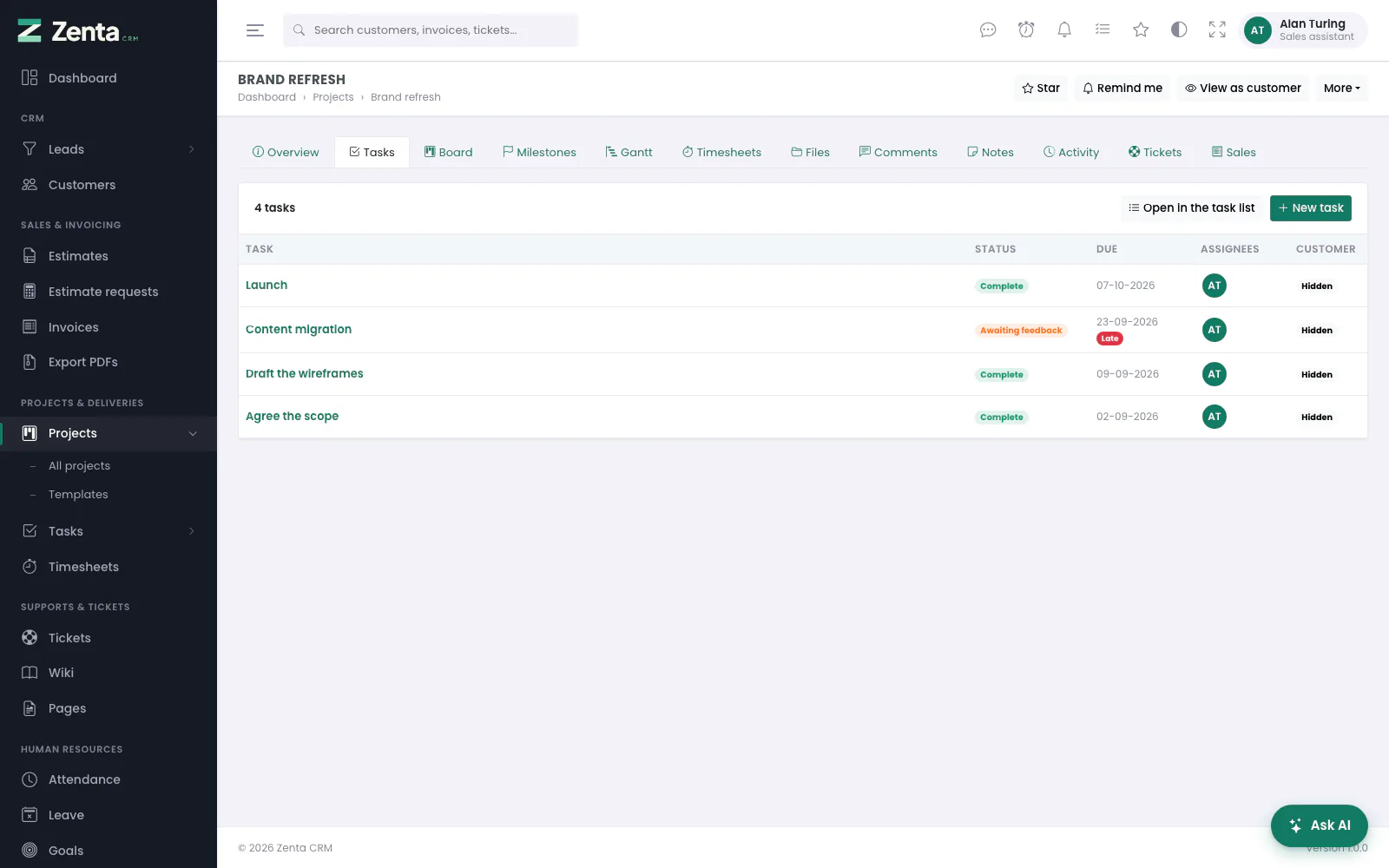 A project he is on, Tasks tab, with tasks on Assigned to them: only the project's tasks assigned to him. Colleagues' tasks, and a private task of somebody else's, are not in the list.
Projects & Deliveries → Projects, described on Projects. Projects offer all six scopes:
| Scope | The projects you see |
|---|---|
| Assigned to them | Projects with you in their Team. The default for a new role. |
| Their clients | Projects for customers you work: their Account owner is you, or you are Also on the account. |
| Their own records | Projects you created. |
| Their teams | Projects whose Team includes anybody who shares a team with you. |
| All records / No access | All of them, or none. |
Inside a project you can see, its Tasks and Board tabs (and the latest tasks on its overview, and its Gantt chart) list only the tasks you could open from the task list: those your task scope reaches, less private tasks that are not yours. On Assigned to them that is your own tasks on the project, as above; to see the whole project's work, your role needs a wider task scope. The Tasks and Board tabs need View on tasks, Timesheets needs View on timesheets, Tickets and Contracts their own modules, and Activity View on staff. Somebody who is given a task on a project by Assign on their profile is added to the project's Team at the same time, so the project never hides from the person working in it.
Tasks
 Tasks on Assigned to them: his open tasks across two projects. New task and Add several are there; there is no Export.
Projects & Deliveries → Tasks, with All tasks and Board; see Tasks.
| Scope | The tasks you see |
|---|---|
| Assigned to them | Tasks with you in Assigned to. Being one of the Followers does not bring a task into this scope. The default for a new role. |
| Their own records | Tasks you created. |
| Their teams | Tasks assigned to anybody who shares a team with you. |
| Their clients | Tasks on projects for customers you work (Account owner, or Also on the account). |
| All records / No access | All of them, or none. |
The Any project filter on the list, the board and the timeline, and the Project box on the task form and in Add several, offer only the projects your projects scope reaches.
A project set to Hide its tasks from the main task table keeps its tasks off All tasks and the board, for everybody; they are still on the project's own Tasks tab, and in the task list filtered to that project.
| Without | What changes |
|---|---|
| Create | No New task, Add several or Duplicate. |
| Edit | No Edit and no Status menu on the task; the board is read-only; checklist items cannot be ticked. You can still comment on any task you can open, and remove your own comments. |
| Delete | No on the task, and no Delete among the bulk actions. |
| Export | No Export on the list. |
Start timer and Log time on a task come from the timesheet module, not the task one: they need Create on timesheets.
Support tickets
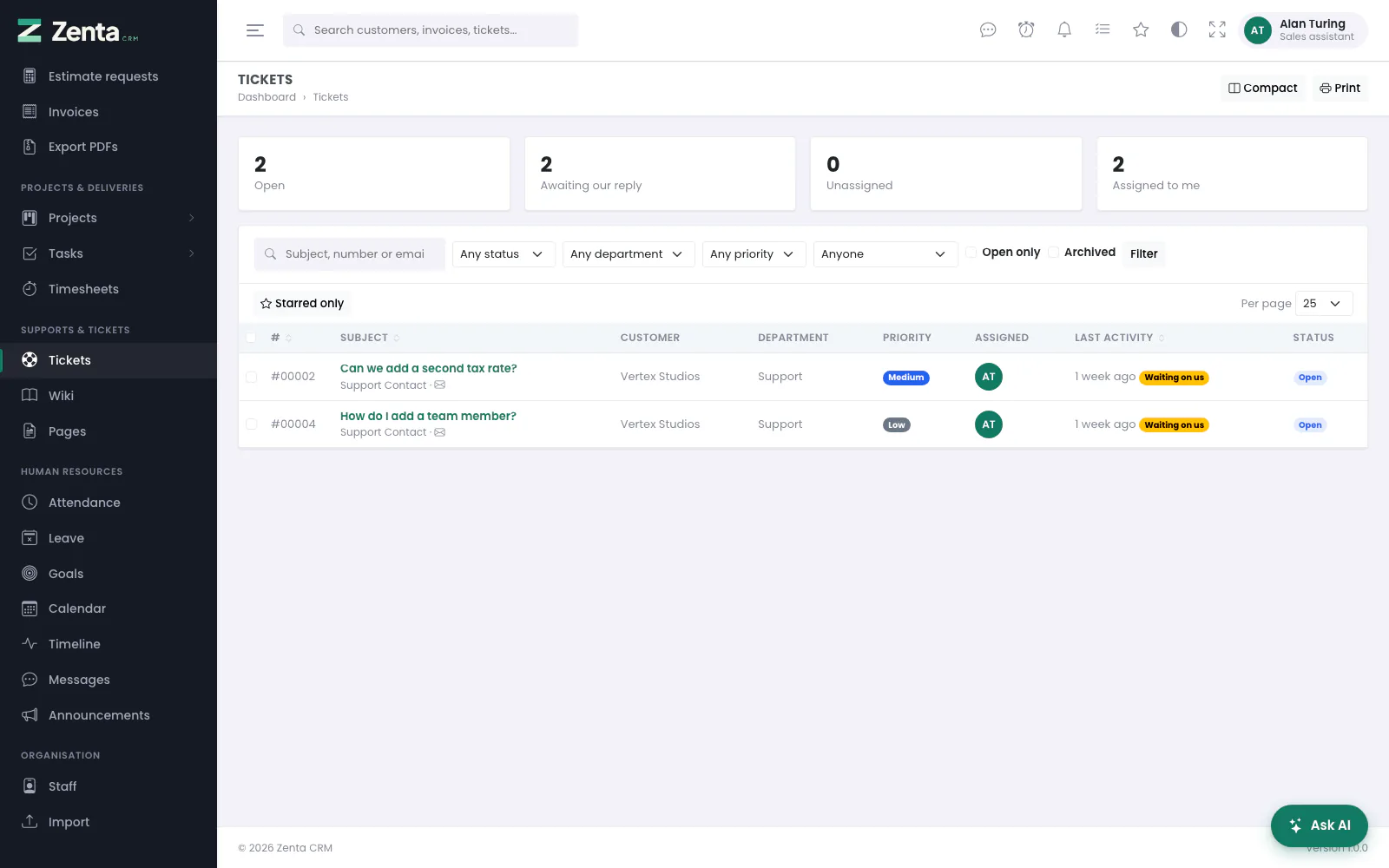 Tickets on Assigned to them: the two he is assigned. Unassigned shows 0 because unassigned tickets are outside his scope.
Supports & Tickets → Tickets; see Tickets and knowledge base.
| Scope | The tickets you see |
|---|---|
| Assigned to them | Tickets whose Assigned person is you. Unassigned tickets are not yours, so the Unassigned count stays at 0 and you cannot pick one up from the queue: somebody who can see it has to assign it to you. |
| Their own records | Tickets assigned to you, and tickets you opened. |
| Their teams | Tickets assigned to anybody who shares a team with you. |
| Their clients | Tickets from customers you work (Account owner, or Also on the account). |
| All records | The whole queue. The default for a new role. |
Two restrictions narrow tickets further: Only these departments and Only these customer groups. The second hides tickets that belong to no customer at all, such as one from the public form that was never filed against a contact. Being a member of a department under the support desk's settings is a different thing: it decides who is told about new tickets there, not who can see them.
Without Edit on tickets you can read a ticket but not answer it: the Reply box and the Status menu are gone and the Assigned picker is greyed out. Without Delete there is no delete; without Create, no New ticket. Logged time on a ticket follows your timesheet permissions.
Timesheets and timers
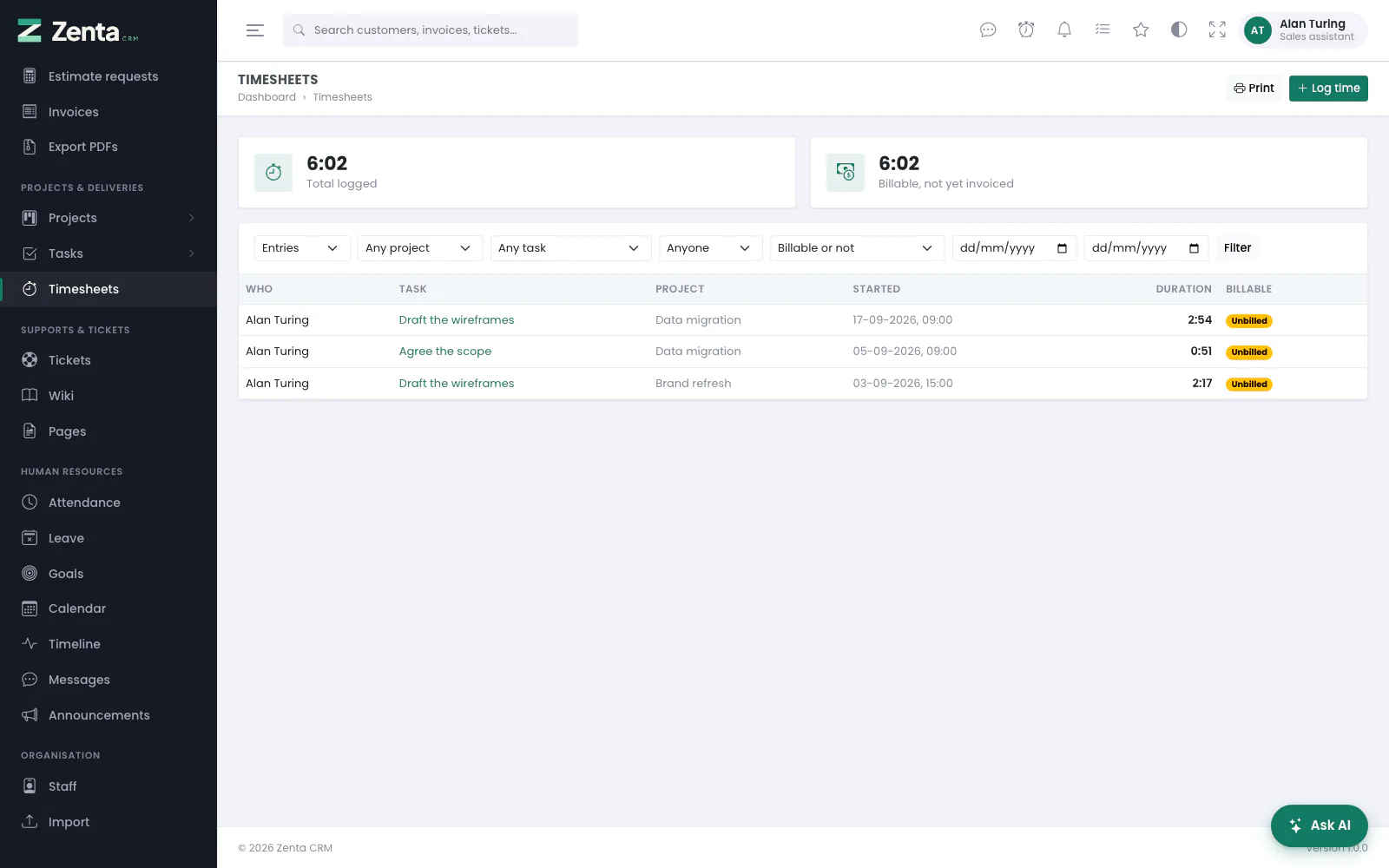 Timesheets on Their own records: only his entries, and the totals over them.
Projects & Deliveries → Timesheets; see Time tracking.
| Scope | The time you see |
|---|---|
| Their own records | Time logged for you. The default for a new role. |
| Their teams | Time logged for anybody who shares a team with you. |
| All records / No access | Everybody's, or nobody's. |
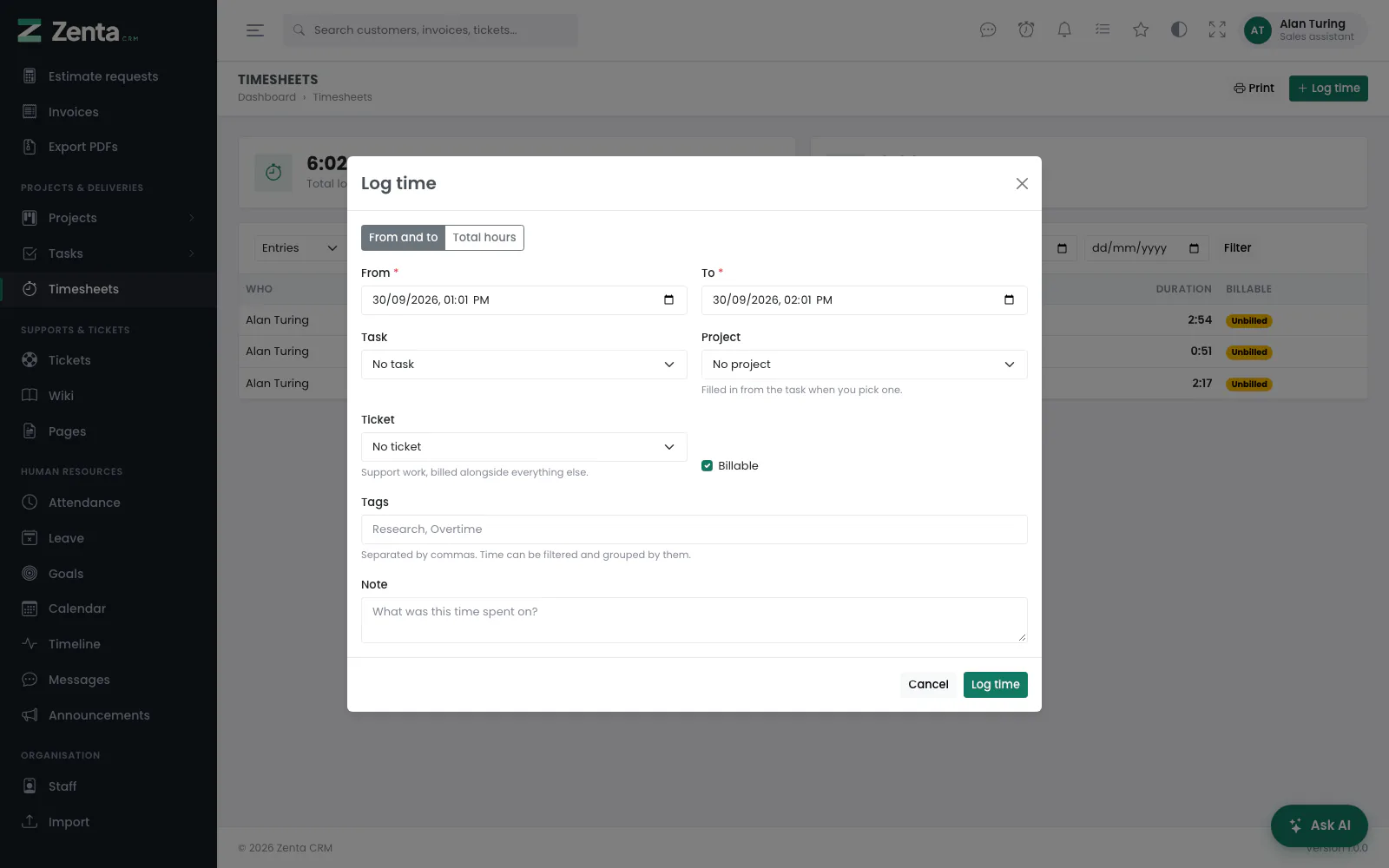 Log time on Their own records: there is no Who field, because the entry can only be his.
- Log time and the timer need Create. A timer is always your own: you start it on a task you can open, and only you can stop it.
- On Their own records the Log time form has no Who field — the entry is yours. On Their teams it lists your teammates, and logging for anybody else is refused with You can only record this for people within your own scope.
- Changing an entry needs Edit, removing one Delete. Time already put on an invoice cannot be removed by anybody: This time has already been invoiced.
- The Task and Project boxes in the dialog, and the Any project and Any task filters on the list, offer only the projects and tasks you could open: your projects and tasks scopes, with other people's private tasks left out.
 The Task and Project boxes opened out: only the tasks assigned to him and the two projects he is on.
Limits on top of the scope
Some modules take a further limit, set by the administrator under the module in the role editor. The scope still decides whose records they are; a limit only ever narrows it, and nothing ticked means no limit (see Roles and permissions).
| Limit | Modules | What you notice |
|---|---|---|
| Only these customer groups | Customers, proposals, estimates, invoices, contracts, projects, tickets | Only records of customers in those groups. Records with no customer at all disappear. |
| Only these departments | Support tickets | Only tickets in those departments. |
| Only these project categories | Projects | Only projects in those categories. A project with no category disappears. |
| Only these AI agents | AI assistance | Only those agents can be chosen in the assistant. |
When your permissions are not your role's
An administrator can change one person's access without making a role for them: Permissions on your staff record lets them override single modules (see Changing one person's permissions). An override replaces the role for that module only — its abilities, its scope and its limits — so two people on the same role can see different lists. Colleagues who may edit roles see an Overridden badge beside your role in the staff list. Nobody can change their own permissions, administrators included.
Two workspace switches sit above every role. A module switched off under Settings → Modules is gone for everybody (see Modules and menus), and Settings → Data export can keep the Export button to Administrators only or hide it for everybody, whatever a role allows (see Who sees the Export button).
Why can't I see…?
| What you notice | The usual reason |
|---|---|
| A whole item is missing from the menu. | Your role has no View on that module, or the module is switched off for the workspace. |
| The menu item is there, but the list is empty. | Nothing falls inside your scope, or the scope is No access, or a limit (customer groups, departments, categories) leaves nothing. |
| A link a colleague sent answers "not found". | The record is outside your scope. It is treated exactly like a record that does not exist (see An address you may not open). |
| I created a lead, assigned it to a colleague, and now it has gone. | Your leads scope is Assigned to them. Add yourself to Also working it before saving, or ask the colleague. |
| Leads from our web form never reach me. | Your scope is Their own records, and nobody created those leads. They need assigning to you under Assigned to them. |
| A colleague's lead is not in my list, though my scope is All records. | It is private: Visible to the whole team is off. |
| There is no Convert to customer on a lead. | You have no Create on Customers & contacts, or the lead is already converted. |
| I can see a customer, but its Invoices tab is empty or missing. | The tab follows your own invoices permission: no View on invoices hides it, and a scope such as Their own records lists only the invoices you created. |
| A task I follow is not in my task list. | Assigned to them counts Assigned to, not Followers. |
| A project's Tasks tab shows only some of its tasks. | The tab lists the tasks your task scope reaches. On Assigned to them, that is the ones assigned to you. |
| A project's Timesheets, Tickets, Contracts or Sales tab shows only some of its records. | Each follows your own scope for that kind of record, exactly like a customer's tabs: on Their own records for timesheets you see your own time on the project, and so on. The hour totals on the Timesheets tab still count all of the project's time; the Sales tab's totals count only what you see. |
| A project or task is missing from the Log time dialog or a filter. | The pickers list only projects and tasks you could open, and never somebody else's private task. |
| A project's tasks are missing from All tasks. | The project hides its tasks from the main task table. Filter the list by that project, or use the project's Tasks tab. |
| The Unassigned tickets count is always 0. | Your tickets scope is Assigned to them: unassigned tickets are nobody's. |
| I am in the Support department but cannot see its tickets. | Department membership only decides who is notified. What you see is your role's scope and Only these departments. |
| I can read a ticket but cannot reply. | Replying needs Edit on tickets. |
| Projects without a category, or tickets without a customer, are missing. | A Only these project categories or Only these customer groups limit hides them. |
| There is no Export button. | No Export ability on that module, or Settings → Data export keeps it from you. |
| There is no Delete. | No Delete ability on that module. |
| I cannot choose who a time entry is for. | Your timesheets scope is Their own records. |
| A colleague on the same role sees more than I do. | One of you has a per-person override. |
| An agent is missing from the assistant. | Your role is limited to Only these AI agents. |
Addresses on this page
For reference and for anyone scripting against the panel. Everything here needs somebody signed in to the workspace whose role allows it; anybody else is refused.
| Method | Address | What it does |
|---|---|---|
GET | admin/leads | The lead list, within your leads scope. |
GET | admin/leads/kanban | The pipeline board; read-only without Edit. |
GET | admin/leads/{lead} | A lead's page. "Not found" outside your scope, or when it is somebody else's private lead. |
GET | admin/leads/{lead}/convert | The Convert to customer dialog; needs Create on customers. |
GET | admin/customers | The customer list, within your customers scope. |
GET | admin/customers/{customer} | A customer's page, with the tabs your modules allow. |
GET | admin/estimates | The estimate list, within your estimates scope. |
GET | admin/invoices | The invoice list, within your invoices scope. |
GET | admin/projects | The project list, within your projects scope. |
GET | admin/projects/{project} | A project's page; ?tab=tasks and the other tabs. |
GET | admin/tasks | The task list, within your tasks scope, private tasks respected. |
GET | admin/tasks/board | The task board; read-only without Edit. |
GET | admin/tasks/{task} | A task's page. |
POST | admin/tasks/{task}/comments | Adds a comment; needs only View on tasks. |
POST | admin/tasks/{task}/timer | Starts your timer on a task; needs Create on timesheets. |
PATCH | admin/timesheets/{timesheet}/stop | Stops your own running timer. |
GET | admin/tickets | The ticket queue, within your tickets scope and department limits. |
GET | admin/tickets/{ticket} | A ticket's page. |
POST | admin/tickets/{ticket}/replies | Sends a reply or a private note; needs Edit on tickets. |
GET | admin/timesheets | The timesheet list, within your timesheets scope. |
GET | admin/timesheets/create | The Log time dialog; the Who field only outside Their own records. |
POST | admin/timesheets | Saves a time entry for you, or for somebody within your scope. |
POST | admin/bulk/{subject} | The bulk bar on a list; each action checks its own ability. Used by the page itself. |
GET | admin/exports/{entity}/{format} | An Export download; needs View and Export on the module. |