Platform settings and sign-up
The switches that belong to the platform rather than to any one workspace: who may sign up, how workspaces are addressed, and what the front page says.
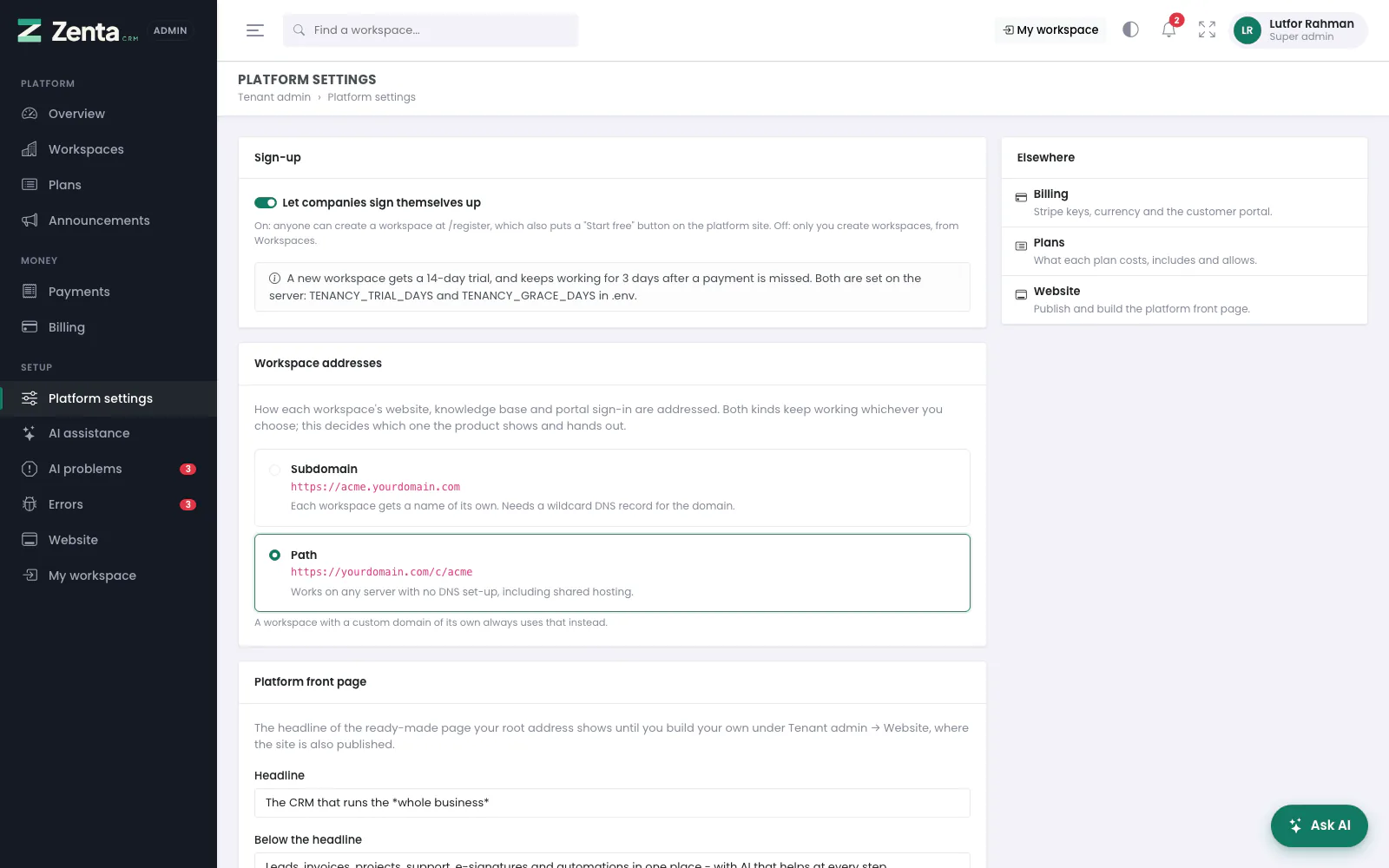 Platform settings: sign-up, workspace addresses, the front page headline, legal links and support.
Tenant admin → Platform settings. Change what you need and press Save changes at the bottom. The Elsewhere card links to the other platform screens: Billing, Plans and Website.
Sign-up
Let companies sign themselves up. On: anyone can create a workspace at
/register, and the platform's front page gets a Start free button.
Off: only you create workspaces, from Workspaces.
The note under it shows the trial a new workspace gets and how many days it keeps working
after a missed payment. Both are set on the server: TENANCY_TRIAL_DAYS and
TENANCY_GRACE_DAYS in .env.
Workspace addresses
How each workspace's website, knowledge base and portal sign-in are addressed:
| Choice | Looks like | Needs |
|---|---|---|
| Subdomain | acme.yourdomain.com | TENANCY_CENTRAL_DOMAIN, TENANCY_RESOLVE_SUBDOMAIN=true and a wildcard DNS record. Until the server is set up for it, the choice is greyed out and says why. |
| Path | yourdomain.com/c/acme | Nothing. Works on any server, including shared hosting. |
Both kinds keep working whichever you choose, so links already shared never break; this decides which one the product shows and hands out. A workspace with a custom domain of its own always uses that instead.
Where people sign in
Everyone signs in at their own workspace's address and nowhere else: its staff at
acme.yourdomain.com/login (or yourdomain.com/c/acme/login), its
customers at …/portal/login. You and your own team sign in at
yourdomain.com/login, and the tenant admin panel opens only there. A correct
password typed at another workspace's address is refused like a wrong one, and somebody
signed in to one workspace who opens another's address is signed out. Sign-up and
Sign in as take the person to the
workspace's own address by a one-time link.
Platform front page
Headline (required) and Below the headline: the banner of the ready-made page your root address shows until you build your own under Tenant admin → Website, which is also where the site is published.
Legal and support
| Setting | Where it is used |
|---|---|
| Terms of service address and Privacy policy address | Linked from the sign-up form, beside the box a new customer ticks to agree. Only http and https addresses are accepted. |
| Support email | Shown to a workspace that is suspended or whose subscription has ended, so its owner knows who to write to. |
How a company signs up
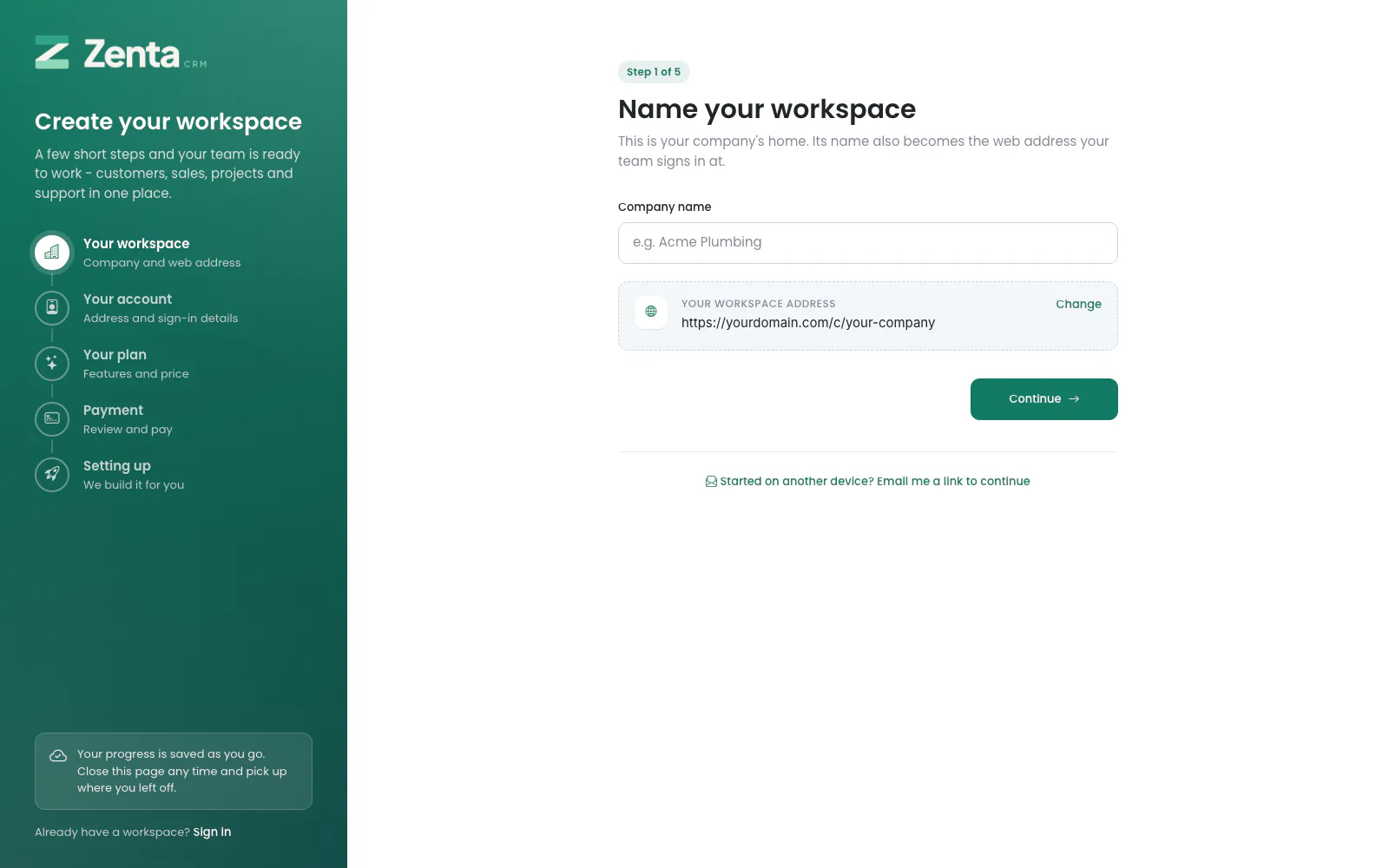 The sign-up wizard, at
 /register.
With Let companies sign themselves up on, /register is a
wizard in five steps. Each step is saved the moment it is continued past, so a closed
tab, a lost connection or a power cut costs nothing: opening /register
again in the same browser carries on from the step it stopped at, with what was typed.
On another device, Email me a link to continue sends a link that picks the
sign-up up there instead.
| Step | What happens |
|---|---|
| 1. Your workspace | The company name. Beneath it, the address the workspace will have, as Workspace addresses says, with a tick or a cross for whether it is free. Change picks a different address. An address is taken if any workspace has ever used it, and held for a week for somebody still signing up with it. |
| 2. Your account | The company's address, the owner's name, work email and password (typed twice, with an eye to show it), and the terms. The password is kept hashed, never as typed. |
| 3. Your plan | Your public plans side by side: price, trial, what each includes and its limits. |
| 4. Payment | A summary and what is due today. A plan with a trial, or a free plan, costs nothing today. A paid plan without a trial goes to Stripe Checkout when Billing is switched on, and the payment is confirmed with Stripe on the way back; with online payment off, the workspace is created and subscribes from its own Subscription screen. |
| 5. Setting up | The workspace is built in ten stages, each with its own progress bar: the user account, the workspace, leads & customers, sales & invoicing, projects & deliveries, tickets & support, marketing & communications, human resources, the organisation and the settings. A stage that is interrupted is simply run again. When the last one is done the owner is taken to the new workspace's own address, signed in. |
Until setting up begins, any step can be gone back to and changed, and Start over throws the whole sign-up away. Once a plan is paid for, it can no longer be swapped.
The form carries a hidden honeypot field, which stops most automated sign-ups without making anyone solve a puzzle. For the ones it does not, switch on reCAPTCHA for Workspace sign-up under Settings → Integrations in your own workspace — this is the most expensive form on the site to have abused, because every submission provisions a workspace and an account that can send email.
Addresses on this page
For reference and for anyone scripting against the panel. Everything here needs a signed-in super admin at the platform's own address; anybody else gets 403.
| Method | Address | What it does |
|---|---|---|
GET | tenant/admin/settings | Platform settings. |
PUT | tenant/admin/settings | Saves them. Refuses Subdomain until the server is set up for it. |
GET | register | Public, no sign-in, while sign-up is open: the sign-up wizard. |
POST | register/plan | Public: saves the chosen plan. |
POST | register/account | Public: saves the owner's name, email and password. |
POST | register/workspace | Public: saves the workspace name and address. |
GET | register/address | Public: checks whether a workspace address is free. |
POST | register/payment | Public: starts payment for a paid plan through the platform's Stripe account. |
GET | register/payment/complete | Public: where Stripe sends the new owner back after paying. |
POST | register/setup/{stage} | Public: one stage of setting the new workspace up. |
GET | register/finish | Public: the last page, which signs the owner in to their workspace. |
POST | register/resume | Public: emails a link to carry on a sign-up later. |
GET | register/resume/{signup} | Public: the link from that email. |
POST | register/restart | Public: starts the sign-up again. |