Troubleshooting
The things that actually go wrong, and what to do about each.
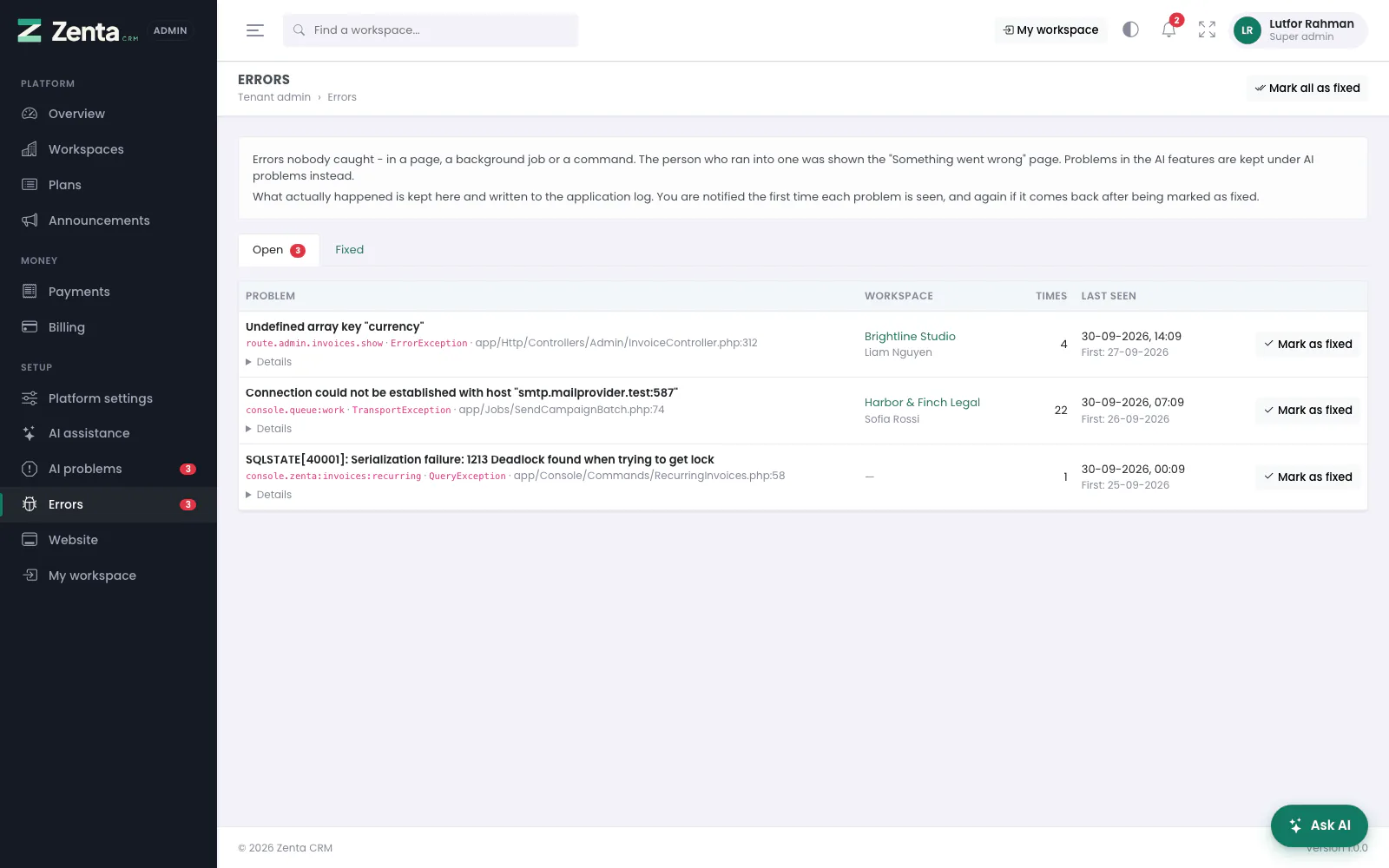 Errors nobody caught, kept for the super admin with what actually happened.
A blank white page
Almost always a permissions problem. Set storage/ and
bootstrap/cache/ and everything inside them to 755, then reload.
If it persists, look at storage/logs/laravel.log — the real error is at the
bottom.
"500 Server Error" after moving hosts
Clear the caches, which still hold the old paths:
php artisan config:clear
php artisan route:clear
php artisan view:clear
If you cannot run commands, delete everything inside bootstrap/cache/ except .gitignore.
The site loads without its styles, or links go to http://
This happens when something in front of your server handles HTTPS and passes the
visitor on over plain HTTP — Cloudflare with its SSL mode set to
Flexible, a host's load balancer, or a proxy. The application only sees that
last plain step, so it writes its links as http://, and the browser blocks
them on a secure page. Hosting where the certificate is on the server itself (cPanel
AutoSSL, Let's Encrypt) is not affected.
Either of these fixes it:
- On Cloudflare, set SSL/TLS to Full (with a certificate on your server, which cPanel's AutoSSL gives you). Cloudflare then reaches your server over HTTPS as well.
- Or tell the application to trust the proxy: add
TRUSTED_PROXIESto.envwith the proxy's addresses, comma separated — or*if nothing but the proxy can reach your server — then clear the configuration cache (php artisan config:clear, or deletebootstrap/cache/config.php).
TRUSTED_PROXIES=*Trusting the proxy also means the application sees each visitor's own address rather than the proxy's — which the IP allow list, the sign-in lockout and the login history all depend on. That is also why it is off unless you set it: the headers that carry the visitor's address can be sent by anybody, so believe them only from the proxy.
Every page but the home page is "not found"
URL rewriting is not working. On Apache, make sure mod_rewrite is on and
that AllowOverride All is set for your folder, so the bundled
.htaccess is read.
On nginx, the server block's root must be the public/ folder, with:
root /home/yourusername/public_html/public;

location / {
    try_files $uri $uri/ /index.php?$query_string;
}
The server skipped the .htaccess file
Opening your site shows Almost there: this server skipped the .htaccess file
instead of the installer. The .htaccess beside the application is what sends
visitors to its public/ folder, and this server did not read it. Nothing is
exposed while that page shows: it loads nothing else, and on Apache the application's own
folders are refused even without the rewrite. Any one of these fixes it:
- The file was not uploaded. Some upload tools skip files whose name starts with a dot. Turn on Show Hidden Files in cPanel's File Manager, and upload
.htaccessfrommain-files/if it is missing — or uploadmain-filesas a zip and extract it there. - Apache does not allow it. Ask your host to enable
mod_rewritewithAllowOverride Allfor the folder. Almost every cPanel host has both on already. - Or point the address at
public/in your panel (the domain's or subdomain's Document Root). The page shows the exact folder to use. - On nginx, which never reads
.htaccess, set the server block'srootto thepublic/folder — the page shows a complete block for your folder.
Either way, check afterwards that your-site.com/.env answers "page not found"
rather than downloading a file: it holds your database password.
Recurring invoices are not being raised
The scheduler is not running. Settings → Scheduler says whether it has run, and gives the cron line to add — see The scheduler. To confirm it works, run this by hand — it should print what it did:
php artisan schedule:runA campaign says "Sending" but nothing goes out
Campaigns are sent by the scheduler, a minute's worth at a time — the
same cron entry as recurring invoices. Run php artisan
zenta:campaigns:send by hand: it prints how many it started,
sent and failed. If that works, the cron entry is missing.
Campaign emails say "Accepted" but nobody receives them
Check MAIL_MAILER in your .env. Set to
log it accepts every message and delivers none; the
campaign screen warns about this. Then work through the list below.
SMS or WhatsApp delivery reports never arrive
- WhatsApp: check the callback URL and verify token are set in your Meta app, the messages field is subscribed, and the app secret is saved — reports without a valid signature are ignored.
- Twilio: nothing to set up, but the auth token must be the one for the account that sent the message.
- Make sure
APP_URLin.envis the public address people use, startinghttps://. Twilio signs the exact address it called, which is built fromAPP_URL; behind Cloudflare or a load balancer the application may see a different one, and the check accepts either — but only ifAPP_URLis right. - Look in
storage/logs/laravel.logfor "failed its signature check".
Some subscribers are never texted
Their numbers are written the local way — 07700 900123 rather than +44 7700 900123 — and no Default country code is set under Settings → Marketing channels. Such numbers are skipped rather than guessed. The campaign page counts them under "no usable address".
Emails are not arriving
- Open Settings → Delivery log. A failed message shows the mail server's reason, and Retry sends it again once fixed. A message still Queued is waiting for the scheduler, or for the next hour's sending allowance.
- Check the details under Settings → Email, and press Send a test: it shows the conversation with the mail server, including the step it refused.
- Use a real mailbox on your own domain, not a Gmail address, as the from address.
- Look in Settings → Error log, or
storage/logs/laravel.log, for the rejection — mail servers usually say why. - Check your spam folder before assuming nothing was sent.
Emails to support are not opening tickets
Look at Settings → Support desk → Mail pipe log. Every message that arrives is recorded there, with what became of it and why. If the log is empty, the forwarder is not reaching the application — check the path in the pipe command.
An upload fails
Usually PHP's own limits. In php.ini, or via your control panel:
upload_max_filesize = 20M
post_max_size = 24M
Also check that public/uploads/ is writable.
I have locked myself out
If you can run commands, reset a password directly:
php artisan tinker
>>> $u = App\Models\User::where('email', 'you@example.com')->first();
>>> $u->password = Hash::make('a-new-password'); $u->save();
Every page says "Temporarily unavailable"
The application is installed but cannot reach its database — the database server
is stopped, or the DB_ lines in .env no longer match it. Visitors
see a 503 page and nothing about why; storage/logs/laravel.log says it. Start
the database or correct .env (then php artisan config:clear) and
the site comes back by itself. The installer stays closed throughout, so nobody can use
the outage to reinstall over your data.
The error log
 Settings → Error log: the end of the application's log file, newest first.
Settings → Error log shows the end of the application's own
log file — the first place to look when something fails without saying why
— without opening the server. The header names the file
(storage/logs/laravel.log, or the newest daily file when the log is
kept one file a day) and its size.
- The most recent 300 entries are listed, newest first, each with its level (error, warning, info…), its time and its message. An entry with a stack trace can be opened to show it.
- Every level narrows the list to one level.
- Clear empties the file, after you confirm. What was in it cannot be read afterwards, so copy anything you need first.
Paste an entry into a support request rather than a screenshot. On a single-company install the screen needs Settings → edit; in SaaS mode it is shown to the super admin only, because the file holds every workspace's errors, and anybody else is told the page does not exist.
Somebody saw "Something went wrong"
Every error nobody caught — on a page, in a background job or in a command —
is kept under Tenant admin → Errors: the real message, where in the
code it happened, the workspace and person, how many times, and the stack trace. The same
error is one row with a count. Every super admin is told in their notification bell and
by email the first time it is seen, and again only if it comes back after
Mark as fixed. It is still written to storage/logs/laravel.log as
before. Problems in the AI features are kept separately, under AI problems.
Two more kinds of error arrive there. A page's own JavaScript failing in a signed-in
person's browser shows as browser, with the script and line. A scheduled
task that fails for one workspace shows under the task's name (for example
console.zenta:invoices:publish) and that workspace; the task still runs for
every other workspace, and exits with a failure so your cron output shows it too.
A save says "You have been signed out"
The page was left open longer than the session lasts. Nothing on it is lost: press Sign in in a new tab, sign in there, come back and press I have signed in, then save again. If the session was still alive and only the page's security token had gone stale, the page renews it by itself and simply asks you to try once more.
Reporting a problem
Please include:
- What you did, and what happened instead
- The last twenty lines of
storage/logs/laravel.log - Your PHP and MySQL versions — both are on the installer's first page
Addresses on this page
For reference and for anyone scripting against the panel. Everything here needs somebody signed in to the workspace whose role allows it; anybody else is refused.
| Method | Address | What it does |
|---|---|---|
GET | admin/settings/system-log | The error log, with a level filter. In SaaS mode the super admin only. |
DELETE | admin/settings/system-log | Clear: empties the log file. |