Billing
Connect your own Stripe account and workspaces can subscribe, pay and renew by themselves.
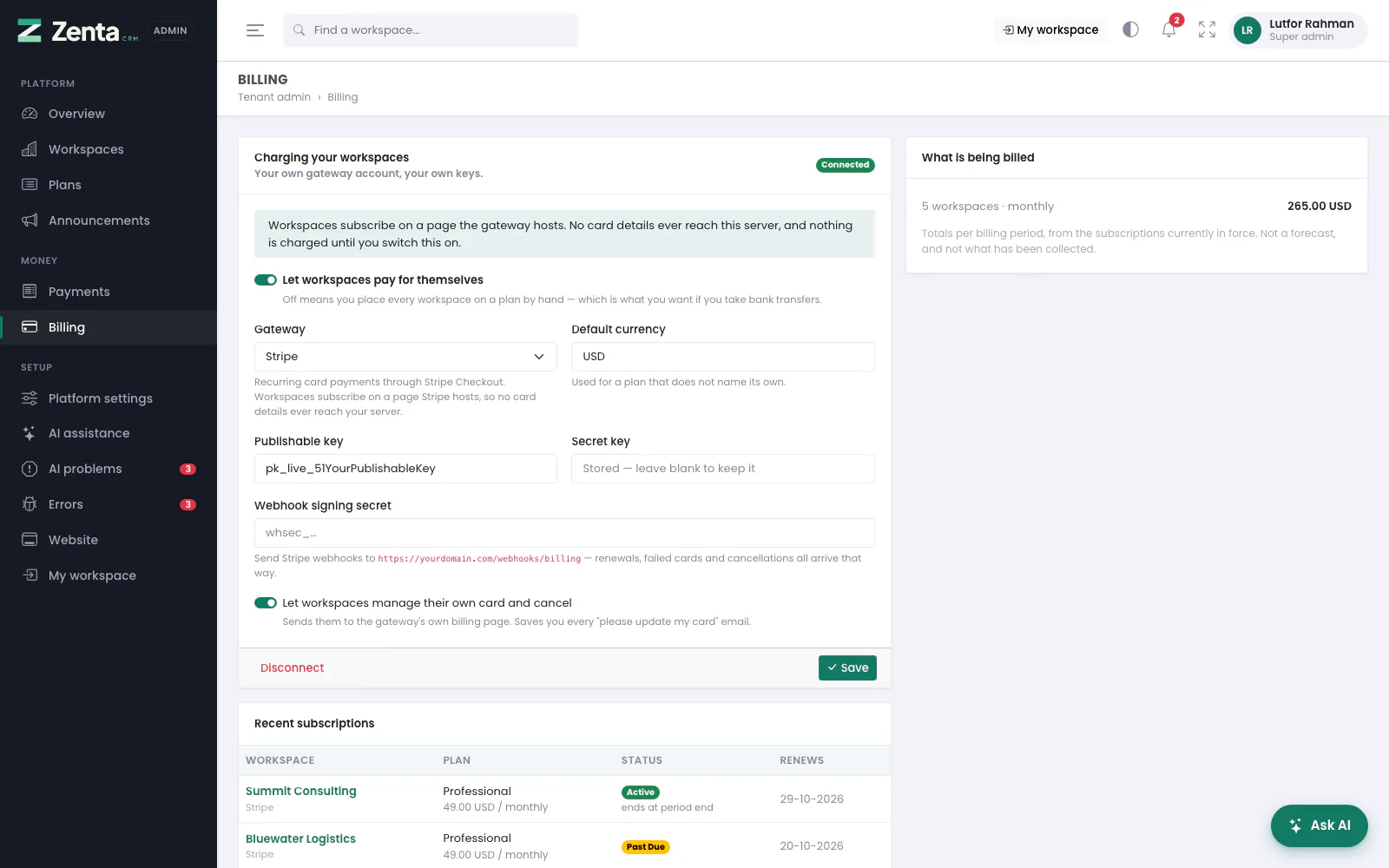 Billing: your gateway keys, the webhook address, recent subscriptions and what is being billed.
Tenant admin → Billing. Enter your own Stripe keys, switch it on, and workspaces can subscribe themselves. Nothing is charged until you do — before that, every workspace is on whatever plan you put it on by hand. Your gateway account, your keys: nothing of ours sits in the middle.
Charging your workspaces
| Setting | What it does |
|---|---|
| Let workspaces pay for themselves | The main switch. Off means you place every workspace on a plan by hand — which is what you want if you take bank transfers. |
| Gateway | Stripe. |
| Default currency | Three letters. Used for a plan that does not name its own, and the currency the overview leads with. |
| Publishable key | pk_live_… (or pk_test_… while you try it). |
| Secret key | sk_live_…. Written once and never shown again; the box says Stored — leave blank to keep it. |
| Webhook signing secret | whsec_…, from the webhook you create in Stripe (below). Also never shown again. |
| Let workspaces manage their own card and cancel | Sends them to Stripe's own billing page to change their card, read their invoices and cancel. It saves you every "please update my card" email. |
Press Save. The badge at the top of the card reads Connected once the keys are in and the switch is on.
The webhook
Copy the address shown under the signing secret into Stripe, under Developers → Webhooks, listening for:
| Event | What it does here |
|---|---|
checkout.session.completed | Puts the workspace on the plan it just paid for. |
invoice.paid | Extends the period and records the payment in the ledger. Brings a past-due workspace back. |
invoice.payment_failed | Marks it past due — not cancelled — and puts the failed attempt in the ledger. |
customer.subscription.updated | Picks up a cancellation scheduled for the period end. |
customer.subscription.deleted | Ends the subscription and the access. |
Disconnecting
Disconnect, at the bottom of the card once a key is stored, removes both secrets and switches self-service billing off. Existing subscriptions stay as they are, but nothing will renew through the gateway until you connect it again.
Recent subscriptions and what is being billed
- Recent subscriptions — the last 25: workspace, how it is paid, plan and price, status (with ends at period end when it is set to stop) and when it renews.
- What is being billed — the subscriptions in force, totalled per billing period and currency. Not a forecast, and not what has been collected: that is Payments.
What a failed card does
The workspace goes past due, not cancelled, and keeps working through the
grace period in TENANCY_GRACE_DAYS. Stripe retries a declined card for
days, and locking somebody out on the first decline punishes a customer whose bank
simply wanted a confirmation. The moment the money arrives they are active again,
without you touching anything.
A nightly sweep closes out any subscription whose period ran out and which nothing renewed — the safety net under a webhook that never arrived.
Taking bank transfers instead
You do not need a gateway at all. Leave Let workspaces pay for themselves off, put each workspace on a plan from its page (a plan and how many months you have been paid for), and record the transfer under Payments. That records exactly the same subscription a card payment would, so whether a workspace is entitled to service has one answer however the money arrived.
What a workspace sees
A workspace owner finds Subscription (under Organisation in the sidebar) in their own workspace: their plan, what they pay, when it renews, what they are using against what the plan allows, the other plans on offer and their side of the ledger. With billing switched on they subscribe or change plan from there, and Manage payment goes to Stripe's billing portal if you allowed it. That page stays open when a lapsed subscription closes everything else, because that workspace is exactly the one that needs it.
Addresses on this page
For reference and for anyone scripting against the panel. Everything here needs a signed-in super admin at the platform's own address; anybody else gets 403.
| Method | Address | What it does |
|---|---|---|
GET | tenant/admin/billing | The Billing screen. |
PUT | tenant/admin/billing | Saves the gateway, keys, currency and switches. A blank secret keeps the stored one. |
POST | tenant/admin/billing/disconnect | Removes the secrets and switches self-service billing off. |
POST | webhooks/billing | Called by Stripe, not by people: subscription events for the platform's own billing, accepted only with a valid signature. |